Buying a game for Steam Deck has always involved a small act of faith. Valve's Verified badge tells you whether a title meets a compatibility checklist, but it cannot answer the question many buyers actually care about: will this game feel smooth on the device I own? A new Steam feature gets considerably closer by showing the average frame rate recorded by players who opted in to share performance data.
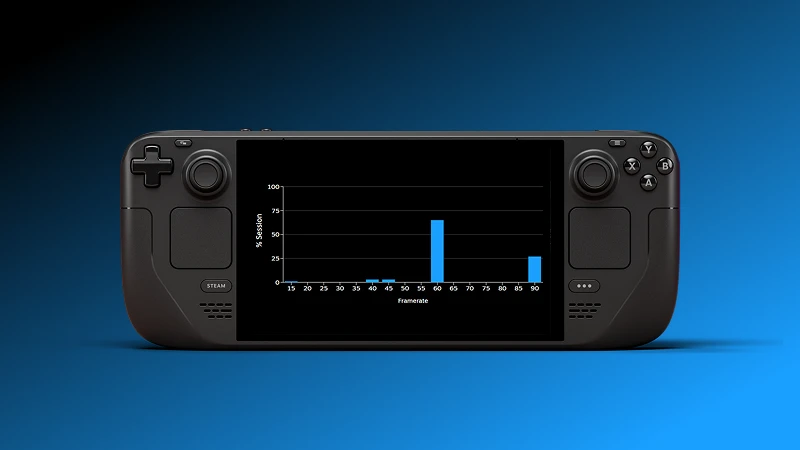
The figures now appear on the game's Steam Store page under Steam Deck Compatibility, behind the Learn More control. Valve says it has data for thousands of games, and that its collection will grow. The same information is being introduced in the Steam Client Beta's Library view. There is also a histogram that shows the distribution behind an average. That last detail is easy to miss, but it is where this feature becomes genuinely useful.
Where to find the new average FPS number
On a supported game listing, scroll to the Steam Deck Compatibility section and open Learn More. If Valve has collected enough eligible performance samples for that title, the panel can display an average frame rate. You do not need to download a separate benchmark app or trust a stranger's carefully edited five-minute video.
The Library integration is currently associated with the Steam Client Beta. A customer using the regular client may not see the exact same presentation at the same time. Valve also notes that not every game has data yet, so the absence of a number is not proof that a title runs badly. It may simply lack sufficient samples.
The new data comes from people who chose to provide anonymised frame-rate measurements. Valve is not claiming that its engineers ran the same laboratory benchmark on every game at the same graphical settings. The crowd-sourced nature is both the feature's advantage and its biggest limitation.
Why the histogram matters more than a single average
Imagine two games showing an average near 45 FPS. The first runs at a mostly steady 45, moving a few frames above or below it. The second alternates between fast sequences and severe dips into the twenties. An average can make those two experiences look deceptively similar.
The expandable histogram breaks down the share of observations at different frame rates. A noticeable cluster far below the headline number may suggest hitching, stutter or demanding sections. Tall bars at a particular value can also reflect players deliberately setting a frame-rate cap. The Steam Deck OLED's 90 Hz screen and the LCD model's 60 Hz screen create different incentives for such settings, and games can be limited to 30, 40, 45 or 60 FPS for battery or pacing reasons.
That means a neat bar is not automatically proof of a perfect experience. A deliberately capped game can be wonderfully consistent. An uncapped game can show a higher average while feeling less stable. The point is to interpret the shape of the data instead of treating its biggest number as a scoreboard.
Why the average will not match every owner's experience
Steam Deck players make different choices. One person accepts a blurry image for higher performance; another turns settings up and locks the game to 30 FPS. Some use FSR or other upscaling methods, while others prefer native resolution. Players may also run different software versions, visit more demanding locations, or use custom power limits.
Valve aggregates opted-in observations across that messy real world. It is not a promise that a particular cutscene, boss fight or crowded multiplayer lobby will hit the displayed average. Nor does it directly predict how a title will perform on another handheld PC, even if that machine seems faster on paper.
You can improve your reading of the number by asking three questions: is the data spread tightly around the average, are there many low-frame-rate samples, and does the experience you want match what typical Deck owners are trying to do? A strategy game that feels comfortable at 30 FPS has different needs from a competitive shooter.
Verified and Playable still have a job
Performance is only one part of handheld compatibility. A game can run quickly but make you squint at tiny menus. Another can deliver a clean image while requiring awkward keyboard input. That is why Valve's existing Verified, Playable and Unsupported labels remain useful alongside the new measurements.
Verified does not mean a game will always run at 60 FPS, and Unsupported is not necessarily a statement that a title cannot launch at all. Those categories address a broader compatibility checklist. Average FPS adds a second piece of information about typical behaviour. The two should be read together.
A good buying routine is to check the compatibility label, inspect the measured FPS and histogram, read a few recent reviews from handheld users and then decide whether the compromises fit the game. This is especially valuable for expensive releases whose PC requirements leave little room for error.
Can you use it to decide between OLED and LCD Steam Deck?
The data is useful as context, but the official announcement does not describe a separate, controlled benchmark for each hardware revision. Do not treat a general game's average as an OLED-versus-LCD comparison or a promise of better battery life. The screens differ, but the central question is whether the actual game experience suits you.
Valve's decision also puts pressure on traditional game storefront labels. A thumbs-up icon is easy to understand, yet it can conceal enormous differences between titles. Giving buyers real performance distributions respects their ability to judge those differences themselves. The feature will become more valuable as the number of contributing games grows and as owners learn to read the graphs without confusing data with guarantees.